How It Works | Goals
Set a goal.Run it on the Goal Canvas.
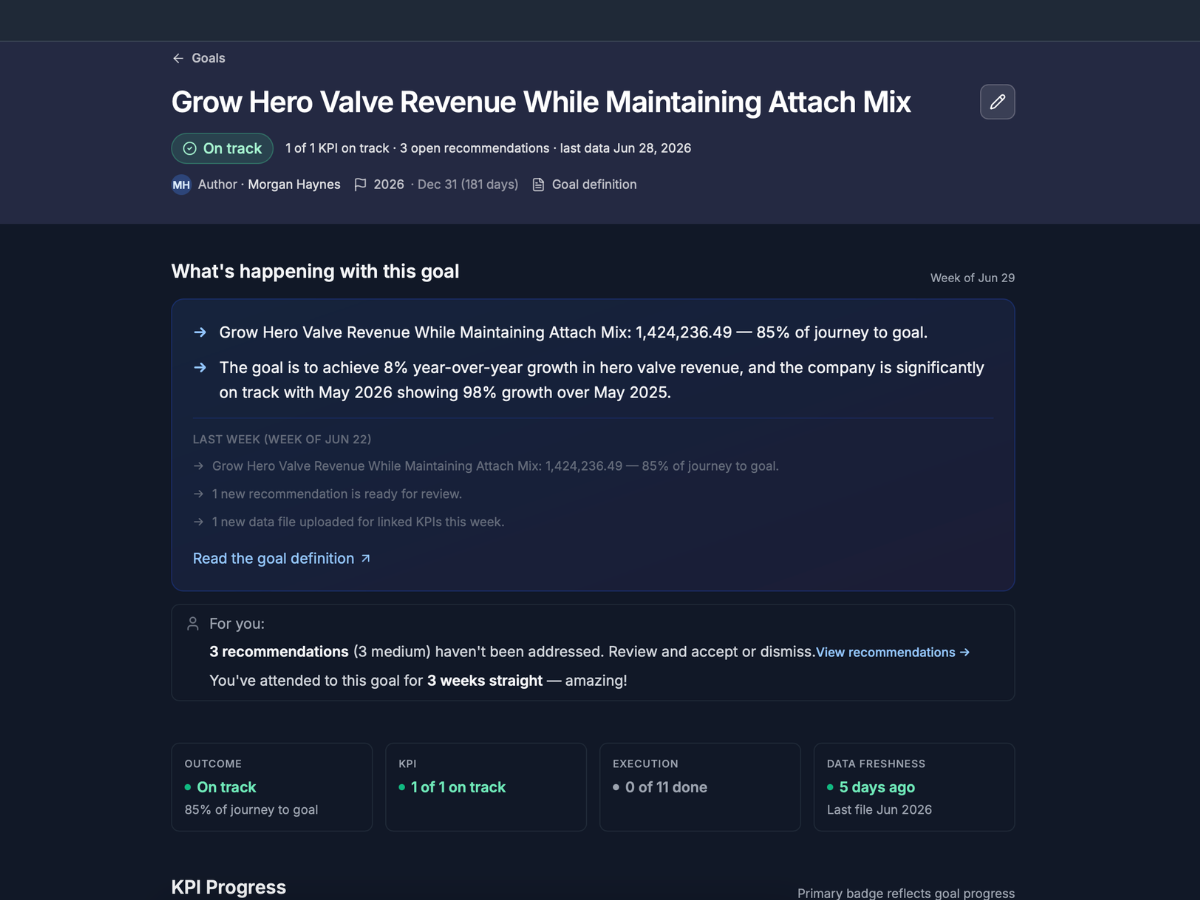
Home is your goals: status, primary KPI, progress, and next best action on every tile. Open a goal and you are on the Goal Canvas, a single scrollable workspace for everything tied to that goal, not a tab bar of separate modules.
Features
Create goals in conversation
Plain language. No forms.
Describe outcome, timeframe, and starting point. Chainworthy structures baseline, target, and goal period for you.
One workspace per goal
The Goal Canvas.
KPI progress, recommendations, actions, activity, and context in one scrollable surface. One server-backed AI thread per goal.
Weekly goal briefing
The one cadence that matters.
Concise per-goal summary of progress, risks, and what deserves attention. Named as the briefing, not as recommendations.
Primary KPI and progress
Always know if you are on track.
Link KPIs; designate primary. Baseline, current result, milestone, and progress update as data lands.
Next best action on Home
One line per goal tile.
Surfaces the highest-value move now, deep-linking into the canvas.
Edit with assistant
Refine without losing context.
Goal-setting and goal-running threads stay distinct but connected.
Why goals come first
- Goals are the spine.
- KPIs measure them.
- Data feeds them.
- Recommendations and actions serve them.
- Events add context the data alone cannot explain.
- When you open Chainworthy, you open your goals.
See the Goal Canvas with your data
Request a demo to walk through goal creation, the canvas, and the weekly goal briefing.